


Annie Baby Monitor: Nanny Cam
4.359.00 Reviews
App Specs
- Version
- 5.42
- Updated On
- License
- Free
- Downloads
- 500,000+
- Developer
- Master App Solutions
- Categories
- Parenting
- Platform
- Android, iOS
Screenshots
 Analysis by AppCompare
When a monitor depends on a connection between two phones, convenience and reliability become the same question. I think that is the right way to judge Annie Baby Monitor: not just by whether it can show a nursery, but by how well its phone-to-phone setup fits the moments when a parent needs to step away. It is a parenting app from Master App Solutions, and its appeal is clearest for families who already have suitable devices and want a flexible way to keep watch.
Why the connection matters in ordinary routines
A phone-based monitor is useful because the parent unit can move with you instead of tying you to a dedicated receiver. That freedom is also conditional: the experience depends on the devices being prepared and able to connect. I would treat setup as part of the bedtime routine, not something to improvise after the baby is asleep. Open the parent view, check that the nursery device is positioned as intended, and make sure the connection is active before heading to another room.
This small habit matters more than any impressive feature list. If you are carrying laundry downstairs or sitting in a nearby room, you want to know the monitoring session is working before you rely on it. A quick check at the start also gives you time to deal with a weak signal or a device that needs attention without disturbing a sleeping child.
Mobile use is flexible, but phones have other jobs
Using a spare phone or tablet as the nursery unit can make the setup feel practical, especially in a home where compatible devices are already available. The trade-off is that a phone is not a purpose-built monitor: it may need to stay plugged in, positioned securely, and left undisturbed while it is doing its job. I would avoid balancing it somewhere unstable or placing it where a child could reach it.
The parent device also remains a phone, with calls, messages, and other everyday demands competing for attention. Before relying on it during a nap, decide where you will keep it and whether you can notice alerts there. If you expect to be busy or move between rooms, a tablet kept in a predictable spot may be easier to check than a phone that is constantly being picked up and put down.
When a stream drops, have a simple recovery plan
The original experience described here includes connection-drop notifications, which can help you notice an interruption, but an alert is not a substitute for a backup plan. If monitoring suddenly stops, I would first check both devices and their network access, then reopen the session if needed. For a baby who is sleeping in a separate room, the sensible response is to verify the child directly rather than assuming the app will restore itself immediately.
That is a useful distinction when comparing an app with a dedicated monitor. A separate monitor may be preferable if you want a device whose only purpose is monitoring and do not want your phone’s battery, notifications, or availability to be part of the equation. Annie is more appealing when flexibility and using existing devices matter more than having a standalone unit.
Worth Reading Before You Choose

EA SPORTS FC Mobile 26 Is a Bigger Football Game, but It Takes Time

Flipboard Shows What News Apps Must Do Beyond the Feed

Switching to Android Auto Means Rethinking Your Driving Routine

Google Calendar Makes a Crowded Week Easier to Manage

Ludo King Makes the Most of the Minutes Between Plans

Baby Panda World Brings Quick Play to Modern Phones, but Its Game Library Feels Busy
Use video thoughtfully when battery and data matter
Live video is reassuring, but continuous streaming can draw power. I would begin with both devices well charged and keep the nursery device connected to power when that is appropriate and safe for its placement. It is also worth thinking about what the parent unit is doing: checking the screen constantly may be less useful than keeping it accessible and responding to the alerts that matter to you.
Because this is a network-based setup, families should also consider their data use and home connectivity, particularly if they plan to monitor away from home. I would test the arrangement in the places where I actually expect to use it before depending on it for a longer stretch. A strong connection at the kitchen table does not automatically tell you how it will behave in a back room, outside the home, or on a different network.
Getting Started with Annie Baby Monitor
First things first, setting up the Annie Baby Monitor app is a breeze. You don’t need to be a tech wizard to get it up and running. Just download the app on two devices, and you’re good to go. One device stays with your baby, acting as the monitor, while the other stays with you as the parent unit.
What I love about this setup is its flexibility. Whether you’re using a smartphone, tablet, or even a laptop, the app supports cross-platform use. So, if you have an Android phone but your partner has an iPhone, no worries—Annie’s got you covered!
User-Friendly Interface
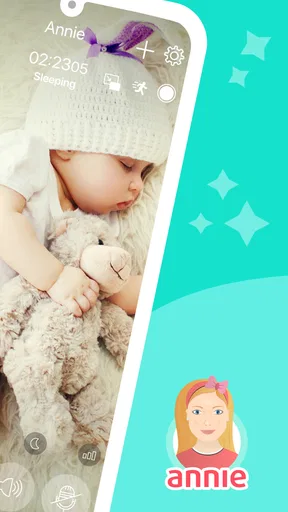
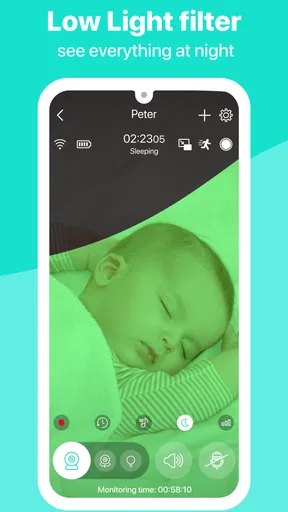
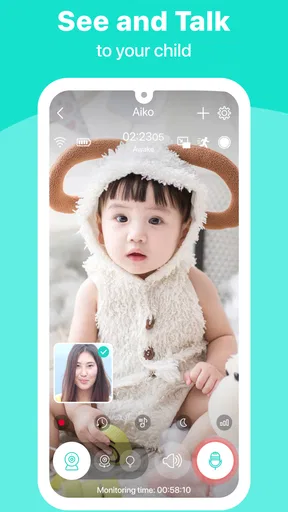
The interface is straightforward, which is great when you’re juggling a million things at once. The main screen shows a live video feed and a simple menu to access various features. You won’t find yourself wading through complicated settings, which is a huge plus when you’re in a hurry.
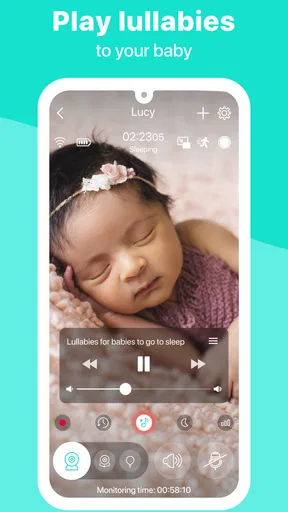
One of my favorite features is the ability to adjust the camera remotely. So, if your little one decides to roll to the other side of the crib, you can easily pan the camera without having to sneak into the room and risk waking them up.
Key Features That Stand Out
So, what exactly makes Annie Baby Monitor a standout choice? Here’s a quick rundown:
- High-Quality Video and Audio: The app provides crystal-clear video and audio, so you never miss a coo or cry.
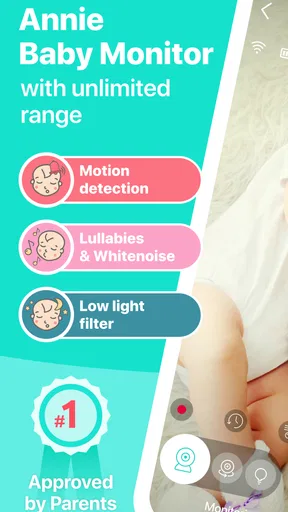
- Unlimited Range: As long as you have an internet connection, you can monitor your baby from anywhere in the world. Perfect for when you need to step out for a bit.
- Multi-Child Monitoring: Got twins or more? No problem. The app lets you monitor multiple children simultaneously.
- Lullabies and White Noise: You can play soothing sounds directly from the app to help your baby drift off to sleep.
Reliability and Security
Security is a big concern for any parent, and Annie Baby Monitor doesn’t disappoint. The app uses encrypted connections to ensure that your video and audio feed is secure. You can rest easy knowing that only you and authorized users can view or hear your baby.
In terms of reliability, I found the app to be consistently stable. There were no unexpected crashes, and the video stream remained clear without any lag, which is crucial for real-time monitoring.
Battery Usage and Alerts
Another thing I appreciate is how the app manages battery usage effectively. While video streaming can naturally drain battery life, Annie offers various settings to optimize usage without compromising on performance.
The app also sends notifications if the connection drops or if your baby makes a sound, ensuring you’re always in the loop. These alerts are customizable, so you can set them to suit your personal preferences.
Choosing it for the right household
I see this as a good fit for parents who have two devices available, want a portable parent unit, and value features such as remote camera adjustment and soothing sounds. It can also suit a household where one caregiver wants to check in while another stays close to the nursery. The practical benefit is less about replacing every parenting routine and more about giving you another way to stay aware while doing something nearby.
A realistic example: after putting a baby down for a nap, one parent can leave the nursery phone in its safe, stable position and take the other device to the kitchen. They can keep an eye on the feed while preparing lunch, then respond to an alert or check the picture if the baby stirs. Before making that a regular routine, I would test the exact device placement, volume, and connection so the setup works for that home rather than assuming it will suit every room.
It is less compelling if you have only one suitable device, want a dedicated monitor that is independent of your phone, or need a solution that does not rely on internet access. I would also be cautious about treating any app as a substitute for checking on a child in person. Monitoring can help you notice activity, but a screen cannot resolve every concern or guarantee that you will see every moment.
Small setup choices that make a difference
One useful tip is to decide on the camera angle before the baby is settled. The remote adjustment is handy when you need it, but getting a clear view of the sleep space from the start reduces the temptation to keep moving the device later. A stable surface and a position out of reach matter as much as the view itself.
For more than one child, think through the layout before relying on simultaneous monitoring. The app’s multi-child capability may be useful for siblings or twins, but each child’s sleeping area still needs a sensible view, and a parent should be comfortable switching attention between them. I would test how the arrangement looks on the parent device during a calm moment, rather than discovering its practical limits in the middle of the night.
Families should also agree on who is using the parent device and how alerts will be handled. If two caregivers expect to monitor, make sure each understands the setup and knows what to do if the feed stops. That simple coordination avoids the false reassurance of assuming someone else is watching.
Cost, compatibility, and the decision to try it
The app is free to download, with in-app purchases listed from $0.49 to $83.99 per item, so I would check the purchase details in the app before deciding whether any paid option is useful for your household. Its content rating is Everyone. The current version is 5.37, and it requires Android 8.0 or later on Android devices.
At a glance, its 4.4 average from around 1,400 ratings and more than 500,000 installs suggest that many families have tried it, though popularity is not a substitute for checking whether your own devices and network suit the job. It was released on May 14, 2020, and the developer is Master App Solutions. I would focus less on those background details than on a short home test: confirm that the two devices connect where you intend to use them, then decide whether the video, audio, and alerts fit your routine.
My verdict on a connected baby monitor
In my view, Annie Baby Monitor: Nanny Cam is most persuasive as a flexible option for parents who are comfortable using two devices and want monitoring that can move with them. Its combination of live viewing, audio, remote camera adjustment, alerts, and soothing sounds gives it more day-to-day range than a basic audio-only monitor, while a dedicated unit may still be the calmer choice for families who prefer a separate receiver and fewer phone-related trade-offs.
I would try it if the convenience of using existing devices outweighs the need for a standalone monitor, but I would test it before depending on it and keep ordinary in-person checks part of the routine. That is the honest balance: the app can make nearby tasks easier and help you stay connected to the nursery, but its usefulness rests on sensible setup, available devices, and a connection you have already tested.
Overall, the Annie Baby Monitor: Nanny Cam has been a fantastic addition to my parenting toolkit. It’s user-friendly, reliable, and packed with features that genuinely make life easier. Whether you’re a first-time parent or adding to your family, this app offers the peace of mind that every parent craves.
So if you’re on the hunt for a dependable baby monitoring solution, give Annie a try. You’ll wonder how you ever managed without it. Happy parenting!
Pros
- High-quality video streaming.
- Easy setup and user-friendly interface.
- Supports multiple parent units.
- Works over Wi-Fi and cellular data.
- Customizable alerts and notifications.
Cons
- Requires stable internet connection.
- Limited free features; in-app purchases.
- Consumes battery quickly on mobile.
- No night vision capability.
- Audio delay on some networks.
FAQs for Annie Baby Monitor: Nanny Cam
How does Annie Baby Monitor ensure the security of my data?
Annie Baby Monitor uses end-to-end encryption to secure all video and audio transmissions, ensuring that only you have access to your data. The app does not store any video or audio recordings on its servers, providing peace of mind that your private moments remain confidential and secure.
What devices are compatible with Annie Baby Monitor?
Annie Baby Monitor is compatible with both Android and iOS devices. You can use any combination of smartphones and tablets to set up your monitoring system. The app also supports multiple devices, allowing you to monitor from various locations or involve multiple caregivers.
Is there a limit to the number of devices I can connect?
Annie Baby Monitor allows you to connect an unlimited number of devices. This feature is particularly useful for families with multiple caregivers, as everyone can stay connected to the baby’s activity. You can easily switch between different devices and maintain seamless monitoring.
What features does Annie Baby Monitor offer to enhance monitoring?
Annie Baby Monitor provides features such as live video streaming, two-way audio, and motion detection alerts. Additionally, it includes night vision capabilities and a variety of lullabies to soothe your baby. The app also offers a temperature monitoring feature to ensure your child’s environment is comfortable.
Is Annie Baby Monitor easy to set up and use?
Yes, Annie Baby Monitor is designed for user-friendly setup and operation. Simply install the app on two devices—one as the baby unit and the other as the parent unit. The intuitive interface guides you through the setup process, allowing you to start monitoring in just a few minutes.


